Author: sogolf

  • What are the key ingredients for a long product life time?

    “What are the key ingredients for a long product life time?”

    A while back I was asked to answer the above questions as part of an expert roundup. The question has been stuck in my mind and I thought about it for a long time. Here is my take on the secrets of long-standing products:

    They keep evolving:

    While the underlying problem that make users look for a solution rarely changes, solutions provided for the problem changes all the time. In order to create a long-standing yet relevant product, teams needs to constantly provide new and innovative solutions to the core problem. Let me explain this concept a bit more:

    Let’s look at Netflix. For them the core underlying problem is to keep their users entertained through watching home movies but over time the solutions they came up to satisfy this need changed dramatically. They started out as a better solution to Blockbuster (remember the franchise that you would go to rent a movie?) with mail-in service but now they are in the business of video streaming. They also changed the type of home entertainment they offer. At the beginning they provided movies and paid back loyalties to movie producers but now they create their own films and movie series. So looking back at the 20-years old Netflix you can argue that they completely renovated itself across all their product offering and services while still addressing the same problem.

    Now let’s take a look at another product. You might have heard of Basecamp, a project management and team collaboration software that has been around for at least 15 years. The company is one of the most successful small businesses in US and their software is wildly popular. What have they done to stay relevant? Turns out every couple of years they go through and build a complete new product!!! and I am not talking about just a visual redesign, but a whole new product rebuilt from the ground up. Even though the product solve the same old problems, but it does so in easier and more modern ways to deliver more value to the user. As far as I know they have gone through two major rebuilds. If you want to know more about their reasoning watch this talk. Another interesting fact is with each major upgrade they didn’t forced customer to move to the newer version. The customers have a choice to stay on the older product or to upgrade to the new one.

    They keep users move forward

    I have written about this previously when I reviewed ‘Badass’ book but one of the fundamental things makes the user repeatedly come back is that if the product helps them build skills and keep them moving forward along the path of expertise. This one is subtly different in that these type of products are more complicated and required continuous users effort. For example if you dig deep into why photographers keep using Photoshop is that post-processing images is considered a valuable skills that separates amateur photographs from professional ones. Photoshop is ‘the’ tool for editing digital images and it can be as small as correcting colors or as complicated as removing a forefront object from a busy background. Although photoshop has a reputation for being complex because it supports a photographers journey from beginner to advance user keep coming back for more.

    What are the other traits of long lasting products that I am missing? Share your thoughts in the comments.

  • Build Your Product Strategy using this Blueprint

    Build Your Product Strategy using this Blueprint

    If you want to switch from waterfall and are new to agile there are many resources and blueprints available to get started and to tell you what to do next. There are courses to take and books to read and experienced people to learn from on how to build, test and ship software in iterative and continuous way.

    But what about all the activities that we do to decide what to build? Is there a blueprint we can follow on what to do next so we can make informed decisions on what to build? If you are like me, you have come across all different methodologies like Design Sprint, Jobs To Be Done, Lean Startup, Customer Development and Design Thinking over time and the question is, how do we know if these tools are helping us, and how do we know what to use when? How do I decide which ones are right for my team?

    I came across a (long) blog post followed by a video of Teresa Torres that answered all the above questions. Take a look at the video:

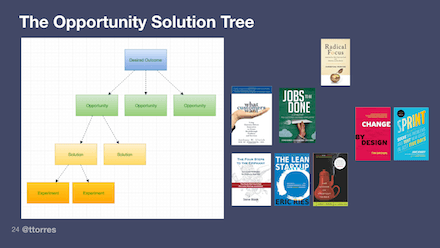
    In Summary, her idea is to build a decision tree (she calls it Opportunity Solution Tree) to make sure that we have thought about different aspect of what to build. The root starts with finding what the clear desired outcome is. We need to define a qualitative objective, combined with quantitative key results, so that we can measure if we are getting closer to our desired outcome. Next comes as identifying opportunities (which is the fancier word for problems and pain points you want to build solution for) and only after these two levels are clearly defined you can compare and categorize solutions and ideas to see if they tie back to the making better outcome.

    The great thing about Opportunity Solution Tree is that it gives you the blueprint I was craving earlier. This means there is a systematic way to use different methodologies at each levels to identify the problems/opportunities, solutions and validate if the proposed solutions will work. This is helpful to me because it it helps me to identify which method to pick. Take a look at this diagram here. In a glance I can now see Jobs-To-Be-Done more focuses at defining the problem but tools like design sprint talks more how to build the solution.

    One final note is like Agile concepts, I think this mapping concept is easy to understand but hard to implement. I am trying this at work right now I will let you know how things go!

  • Book Review: Badass – Making Users Awesome

    As you can see from my resource page, I am a huge fan of Kathy Sierra, so as soon as I learned she has written a new book I grabbed a copy and I was blown away. Kathy uses her distinctive style of using people with bubble talks to breakdown and explain complex stuff in easily understandable and fun way. However don’t be fooled that with all the white space, pictures and bubble speeches the book is easy or a fluff. Instead it is packed with lots of material on cognitive science and leaves you with many ideas on viewing your product in a totally different way.

    Making Users Awesome compromise of two different sections. 1. what is the reason that we use one particular product or service over other similar choices and 2. how we build skills over time and what are the ways we can accelerate learning skills over a short period of time.

    On part 1 the book’s main argument is that people pick a tool or service over others when they trust the recommendations they get about that particular product or service. When a friend or a family member talks to us about a recent app or a product they have used or when we pour over guests testimonial on Airbnb, we are likely to pick products, apps and hosts based on these reviews over what a particular brands is portraying. Why do we trust friends or even strangers over the brands in choosing something?

    The surprising answer comes from the fact that no one uses an app or a service because they really want to get good at using it; instead we use the app or services to be good at whatever real-world domain this software works with. We choose a recommended app or service when see someone else is making progress and becoming better at our desired real-world domain. Our desired real-world domain can be anything, it can be experiencing a city like a local or becoming a front-end web developer.

    The second part of the book looks at how people learn skills, the nature of expertise and how one can learn skills in a short span of time. One big take away for me was that, when we start learning something we try to take in everything and we are told that “Practice makes Perfect” so repeating and reviewing what we have learned so far will make us better. However the book shows us that we have only mastered a skill if we can achieve 95% reliability in repeating the task within 1-3 45-90 minute sessions.

    If we can’t achieve this then the typical reaction is to repeat the exercise all over again. However we should realize that if we can’t do the skill it’s probably because there’s a small sub skill that we need to master first. So our next step is to break this skill down into its components, master those and then try the original skill again. She calls this principle “Half-a-Skill betas Half-Assed skills” ! 🙂

    The book has so many other interesting takeaways and concepts that I didn’t cover to it so go read that book. Seriously. It’s badass itself!!

  • How to have make developers love you (as a PM)!

    Whenever I get a chance I listen to some the excellent talks available on Mind the Product website. Over the course of past several weeks I came across three different talks about creating and maintaining a better relationship between the Product Manager and Development team. They also got me thinking about my own experience working with Dev for the past 7 years. Here is what I have learned:

    Learn the Dev Language:

    You do not need to have Computer Science or an Engineering background to be a product manager (although that can be helpful) but if you work with engineers learn to talk their language definitely earn their respect. Again I want to emphasize that you don’t need to be a programmer but you should have a solid understanding of software development life cycle (specially how the software is deployed and released), the technology stack, how the data flow from front-end to back-end through and back through different components (system architecture) and .

    Read this excellent article from Brandon Chu on what he recommends to know about technology. Also I found this article from Suzie Prince about the Continuous Delivery and DevOps quite enlightening.

    Build a Shared Understanding:

    I talked about the importance of shared understanding among the team in my review of User Story Mapping book. As a Product Manager define in your user stories Who you are building for, Why building this feature or functionality is important. Although I usually come with a suggestion on What to build, I love to see what my team comes up with and if I find their suggestion more convincing than mine I change it. I try to avoid prescribing How the feature should look or function as I trust my team they can figure this out much better than I can.

    All of this discussion happens during weekly Backlog Grooming meeting and after a couple of back and forth the ask is clear for everyone. This approach has been tremendously helpful to make sure what dev team is building is what I asked for.

    Learn to Work Asynchronously:

    I used to walk to the engineering section and tap on someone’s shoulder to get an answer to my question. I couldn’t figure out why I was getting hostile looks and short yes/no answers to my perfectly valid questions!! Oh, now I exactly know why they filled so pissed off! I was interrupting them the way everyone interrupts me now (karma!). And when you’re interrupted, you’re not getting work done. Interruptions break your workday into a series of work moments and you can’t get meaningful things done when you’re constantly going start, stop, start, stop.

    The remedy is to learn to work Asynchronously. If your question doesn’t need a response NOW cancel that face-to-face meeting and send an email message instead clearly outline the question and highlight when you need an answer by. Now if you don’t hear back by the date indicated you have perfectly valid reason for the tap on the shoulder 😉 Another good trick I learned from Sherif’s talk on how to make decisions without having meetings.

    Make that Decision:

    Ideas and requests come from all over and one of the benefits of having a product manager on a team is that s/he makes the decision of what needs to be built “Now” as oppose to  “in Future” versus “Never”. Developers need to always know that the code they’re working on now will deliver the most value and they need to focus on building just that. You are here to shield the team and you should be the single point of contact where ideas and requests internally and externally flows in. Listen to all ideas, evaluate them, analyze them and make an informed decision and stand by it. I will write a separate post on how to prioritize.

    Agile Works (even if it sucks at the beginning):

    Agile is all about teamwork and although it’s easy to get trained on principle of Agile in a day or two, working in an agile team at the beginning is hard. Like a lot of other newbie teams, My team and I had a rough start. Not only as a team we were trying to understand how to work and trust each other but also we were confused on how to build, test and demonstrate something small enough in two weeks time that provides value. Over time, it started to get easier when back-end developers tried front-end coding, hand-off to QA happened earlier. Automation testing happened. We wrote smaller stories and sized them during grooming meetings. We put a Definition of Done in place and soon enough the work didn’t piled up anymore. Bringing a culture of listening, self-organization and collaboration was hard but now with having agile values in place, the fruit is sweet 🙂

    PS: Here are the talks in random order: A Product Manager and a Developer Walk into a Bar by Sherif Mansour , 11 Things your Dev team wants from You by Christin Gorman  and Product Owners: How to Get Your Development Team to Love You by Ron Lichty

  • What is Definition of Done and why it is important to have one?

    Imagine you are doing major renovation on your house, like you are adding an additional level and you hired a team of top-notch contractors to do the renovation. Two months into the process, a representative of contractors informs you that they have completed all the work and they are done now. How do you determine if the work is completed? You will go and check out that second floor, you make sure they built it based on the agreed upon layout, there is running water and working electricity etc. Basically your verify their claims by going through a checklist to make sure completed work is to your satisfaction before you pay the contractors.

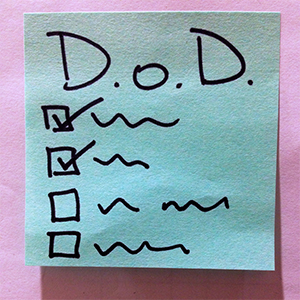
    Definition of Done does the same thing. It is a check list of all the items to be checked off before your team declares the story is completed. Unlike “Acceptance Criteria” that is specific per story and describes what the ask is, Definition of Done (or DoD for short) establishes what must be true of each product backlog item for that item to be done.

    DoD is partly done by your development team because it is their job to write high-quality, high-value software. So it is on developers and testers to define what quality is but you as Product Owner can add other criteria too. In the end both you and your team should agree on the Definition of Done before you start the first sprint. Let me explain this a bit more by showing you what my team Definition of Done is:

    Each item in our backlog will be “Done” when….

    • Acceptance criteria & functional testing is met.
    • Code is peer reviewed by another developer and meets development standard.
    • Unit tests written and passed.
    • There are no critical or high bugs open.
    • English & French content written and validated.
    • Feature is tested across supported platforms & browsers as per the Official Canada Post browser support.
    • Feature is tested for Accessibility; Web Content Accessibility Guideline (WCAG2.0) targets level A, AA.
    • Feature with new UI elements is tagged for analytic.
    • Remaining hours for task set to zero and task closed in Jira.

    As you can see in example above the first four items define quality baseline of the code. However other criteria such as accessibility, dual language or administrative tasks in Jira speak to other aspects of being “done”. Definition of Done is a living document which means that you have to keep revisiting it to refine the “done” criteria to make sure they are still up-to-date and relevant to your stories and products. For my team during every sprint planning we quickly visit the DoD to make sure if it needs further tweaking.

    After using DoD from stories for a while now I have extended them to software releases as well. I find having a release DoD where I have a checklist of all the things to be done prior to release extremely helpful.  This helps my team not to miss any big ticket item. Here is DoD prior to every release:

    And finally one last check list that is very powerful is to have Definition of Ready for each story. Definition of Ready verifies all pre-requisit work is completed before a story is ready to be pulled into a sprint. For example you have a story that lets user to to a date range and export some data based that time frame. This story needs a UX pattern, visual design for date selector and copy associated with the exporting function before it can be passed on to developers. You can create a Definition of Ready checklist so that a new story will NOT be pulled into the next sprint unless all the UX, content and VD sub-tasks are defined and completed. I find this is as a great approach to take the risk dependent external work out of your sprint.

    Hope you enjoy these checklists as much as I do 🙂

  • My Recommended Books with Strong Ties to Product Management

    Past few months I have read the following books all related to product management. They were all excellent. I learned new techniques to write user stories, tackle prioritizing them and to strengthen my concentration on the task at hand. They also provided me new perspective on what skills I need to master to become a better leader.

    Book Summaries

    user-story-mapping

    User Story Mapping

    I came across the book shortly after I became a Product Owner to my newly-formed agile team and like many other newbie product owners I was struggling with how to chunk out the product I envisioned to build into smaller pieces by writing user stories. I also had difficulty on how to write these stories in a way that captures all the nuances and requirements. Thankfully User Story Mapping provided an answer on above issues for me. Here are the two main things I learned from it:

    As a Product Owner I can never capture all the requirements of a product and I can’t specify all the functional and technical details in just one document. Even if I could, this document would be so massive that most people wouldn’t read it. Even if they would they will have their own interpretation of what it means!!

    A better approach is to outline my ask as a story and use that as a starting point to a productive conversation. By the end of this conversation, the ask is more clearly defined and everyone have a shared understanding of what it is. My goal is then to document our understanding using words and pictures.

    The real goal of using stories is shared understanding. Stories get their name from how they should be used, not what should be written.

    Another valuable lesson is that focusing solely on backlog is dangerous. Without having a big picture of what the product is trying to accomplish and what types of activities people use this product for, building one small thing after another from a flat backlog results in a product with mismatched features. The solution is to build a Story Map!

    The biggest benefit of creating a user story map prior to building from a backlog is that it forces you to tell the story of all the interactions the user has with the product to accomplish something. This will give you the big picture of what your product does and in the process it identifies gaps that no one has thought about before.

    Creating a user story map is easy. At the top of the map are big stories (also known as user activities). These stories are too big to do in one sprint or an iteration but once implemented they provide major functionality to the user. The big stories are placed next to each other from left to right. If nothing else, reading these stories provides a view of the whole system.

    However to get these big stories done we need to break them down further into smaller stories. These smaller stories or tasks are placed in the second row and this breaking down continues to a level that provides enough clarity into what the system does. For more detailed explanation check out this blog post from author itself.

    hard-thing-about-hard-things

    The Hard Thing about Hard Things:

    I came across ‘The Hard Thing about Hard Things’ through reading Ben Horowitz’s blog and I am glad I read it. The book has two main parts: The first part is an easy to read, humorous but enlightening account of how Ben Horowitz managed Loud Cloud and Opsware, two companies he co-founded and run as a CEO. The second part is lessons  learned along the way of managing though hard situations.

    Second part of the book has too many good advice to recount them all and they go beyond my focus on Product Management. These are my most important takeaways:

    What resonated the most with me was the importance Ben placed on providing the right training for the job and making it clear what an employee is accountable for. He argues that if you don’t train your people, you establish no basis for performance management. As a result, performance management in your company will be sloppy and inconsistent.

    I personally have always struggled with this one. Unlike a developer or a designer who produces tangible results, product manager’s work spread across many areas and is not as tangible. If my company provides training for the specific skills and what it expects of me, it will save me a ton of time and the confusion and frustration of trying to figure this out by trial and error.

    Another issue this book confirmed for me is that everywhere there is bias to dismiss or rationalize leading indicators of bad news and only listen to good ones. Doesn’t this paragraph rings true in your head?

    If a CEO hears that engagement for her application increased an incremental 25% beyond the normal growth rate one month, she will be off to the races hiring more engineers to keep up with the impending tidal wave of demand. On the other hand, if engagement decreases 25%, she will be equally intense and urgent in explaining it away: “The site was slow that month, there were 4 holidays, we made a UI change that caused all the problems. For gosh sakes, let’s not panic!

    This explains why when Product Managers and executives see the growth is stalling and partners are leaving they avoid the obvious: The product is not the best in the market and is lagging behind competition. There is not much to do but to take the hard step of building a better product.

    Finally the most important and the most unexpected truth that came out of this book is on how to hire good executive. It talked about how to hire for key run a specific job (like VP of sales) for sometime yourself to learn what skills for that job you’re looking for. Although this one is not directly related to Product Management per se, I found it incredibly valuable in not only for hiring but also building framework for career development. You can read it in its own entirety in this brilliant post.

    deep-work

    Deep Work:

    This book is not directly related to Product Manager but it’s a book that if you are committed to follow through its advice it will change your life. The first part of the book starts with what Deep work is and why it is important to work on truly hard things with intense focus?

    Deep work is the ability to focus without distraction on a demanding task. It’s a skill that allows you to quickly master complicated information and produce better results in less time and it is a extremely valuable skill to have in the over-distracted world we live it.

    The author,  Cal Newport, goes on to explain in great detail on why deep work is valuable and meaningful but it is still rare. And honestly you do not need to read page after page to know why: Just take a good look at your work environment and daily habits and keep a tab on hours you actually focus on a hard task and I bet you’d be surprised on how little and fragmented your deep work is. I am first to admit that I suffer from a distraction and constant context switching: With so many interesting articles to read my browser has tens of tabs open that I read only half through. As part of open office trend and agile work style I work in a large room shared with 9 other colleagues and an ongoing open video conference so anyone can ask me anything anytime. And my day most of the time slices to a million of 30 min meetings.

    So how to cultivate the habit of working deeply in out day-to-day life? Here are my take away from the strategies suggested to in the four main rules suggested in the book to achieve deep work:

    Work Deeply

    Unsurprisingly this is rule number 1 on how to allocate enough time in your life to an uninterrupted work. There are multiple philosophies to schedule deep work in your day. For me building a daily routine around deep work and practicing it everyday is the way to go.

    Embrace Boredom


    Focus is a skill that must be developed before you can do it with any effectiveness and in order to strengthen your ability to focus, you must avoid the temptation to entertain yourself the minute you are bored by reaching out for the phone. One  suggested method to practice this skill is to cut off internet for some time interval and focus on the task at hand. Don’t check emails, surf the web or any other internet related activity during this time.

    I have been doing this for the past couple of days and I can tell you firsthand it’s hard! As soon as I find something that is hard to work through or make progress, a few seconds later, I catch myself to have opened a new tab or checked my email unconsciously.

    Quit Social Media

    Out of all rules outlined the most provocative one is to quit or dramatically cut back on the most beloved and addicting social media sites like Facebook, Twitter, Snapchat and so on. A core idea of this rule is that most people select digital tools using the any benefit mindset, which claims that you should use a tool if it can provide any benefit. This rule argues that you should instead use the craftsman mindset in which you only select the tools that provide the most substantial benefits to the things you find most important.

    Drain the shallows

    Finally having a fix time where you leave work and wrap up your work day forces you to be ruthless on what are the important stuff that get done.

  • 5 Tips for Managing Products Remotely

    After reading A Year Without Pants I became interested to know more about remote work and specifically how it works with product management. What qualities are required? What are the advantages and disadvantages? so I did some research such and interviewed a couple of my colleagues who work remotely as Product Managers. I like to share what I learned along the way with you. Let’s get started:

    The practice of working remotely has been on the rise for sometime. In US alone, number of people who regularly work-at-home has grown by a whopping 103% since 2005. (For more interesting data take a look at latest Telecommuting statistics). There is no denial that work from home is a real attractive option and if you need more convincing reasons just read the book Remote. I myself dream of working from home where I don’t need to commute to work everyday (specially in winter time), I can get something done without getting interrupted multiple times and have flexibility over my schedule.

    However most of the telecommute jobs I have seen are for well defined jobs such as software engineers, designers and customer support members.  There are few remote product manager jobs out there and I have always been wondering why? Can it be that there is no need for product managers in companies where work is done 100% remotely?

    I believe the answer lies in company’s size and maturity and not on how it’s distributed. In small companies with a single product and  a small team, different team members take on additional responsibilities to divvy up the work. Usually the founder who is also the CEO takes on responsibilities such as talking to customers and defining product vision. Then designers and developers are responsible for turning that vision into workable software. In this setting, the product management role is distributed among the team and no single person is responsible for the job.

    However as soon as the company grows and the product becomes more complex the work itself becomes too much of an overhead to do for designers, developers and founders on top of what their main responsibilities. Someone needs to clarify Who we are building for and Why to free up the rest of the team to focus on How. This is when Product Manager is added to the team. (Take a look at black box of product management article for an in-depth explanation).

    So if being a remote team as oppose to a co-located one has no effect on having a product manager role, how does remote product management work? What qualities are required? What are the advantages and disadvantages? I sat down with three of my colleagues who all work as Product Managers remotely to get answers to my questions.

    For my first interview I talked with Alex whom I had the pleasure of working with for a long time at OANDA. OANDA’s main focus is currency trading and its popular online trading platform known as fxTrade enables trading volume of several billion dollars a day. Alex has been working remotely for the past 6 years and he currently manages fxTrade across all platforms (Web, Mobile Browser, Mobile App). Design and development are all centrally done in Toronto. Alex travels every 2-3 weeks from San Francisco to Toronto and stays for a week.

    Then I sat down with Barbara who works as Product Manager for Mozilla. Barbara works on Firefox browser for Android app. Her development team is geographically dispersed across the globe. Barbara is based in Toronto but she travels once a month to one of Mozilla offices in States and stays with the team for a week.

    My final interview was with Saeed who works in Product Management at Informatica. Informatica provides solutions around data for the Cloud, big data, real-time and streaming. Saeed is based in Toronto but his team is spread across India and in northern California. Except for annual planning meetings in Informatica headquarters he does not travel.

    Top 5 observations about working as a remote Product Manager:

    Here are the most interesting things I learned through my interviews:

    1. We all work remotely to some degree

    “Business expand across locations. With the exception of small companies, where everyone is in one location, as a Product Manager you have to work with remote people and teams… and of course, customers and partners are NEVER at HeadQuarter. 🙂 “

    When you come to office even when you are co-located with the development team, you need to work with other parts of business such as Sales, Marketing, and Customer Care which may be at different locations and time zones. So being able to work with others through email, phone, chat or whatever remote communication channel is a must no matter how you work.

    2. Communication and Collaboration

    “None of the team members I regularly work with are in the Toronto office, pretty much 99% of my meetings are held over Vidyo (a video chat system used at Mozilla)…We [also] heavily use IRC and Slack, as well as Bugzilla and email to communicate.”

    Email, phone, video conferencing and instant messaging (Slack being the most popular one) are used for communication with team members. However what is more important than choice of tools is to make sure crucial information isn’t lost between colleagues. Barbara and Alex find traveling at least once a month necessary to make sure that everyone in the team is in-sync.

    For collaboration, screen sharing software like WebEx, project management tools such as Trello and wiki softwares to quickly edit content like Confluence and Google Docs are all part of the remote toolbox. Good written communication is the single most important skill to make sure everyone has a shared understanding of what the ask is and how to provide a solution.

    3. Trust is the Key

    “I have built a close relationship with my team over time and now I trust my them to know my vision really well… I’m confident that they will be able to represent and defend this vision to others during a meeting when I’m not in the room.”

    Product Manager has to earn the respect and trust from the programmers and designers. With trust, PM can discover how to get the best possible work from the team. If there is clarity on the goal and a criteria that defines it, then we can speak the same language about what we need to do to get there. This issue becomes even more important when you work remotely as you need to build relationship over time and and you need to make sure you can effectively convey the vision to everyone on the team.

    4. Biggest Advantages

    “I can be more productive because I’m working somewhere else. I don’t get pulled into meetings where I can’t contribute mostly because I’m not in the office. As a result, until something important comes up that needs my attention I don’t get called into meetings.”

    One thing that stands out in addition to all of the advantages of remote working, is the fact that you don’t get tied up with unnecessary things to do inside the office. Instead you can use that time into do some strategic activities like talking to customers, delving deep to understand the problem and figuring out product/market fit. These tasks require long and uninterrupted attention which is something that gets harder to come by when you work in a room with 10 other team members and a constant flow of chatter and calls.

    5. Main Drawbacks

    “There are advantages to working in the same office as the product team. It’s very easy to get the group together to discuss an urgent issue. The proverbial “water cooler conversations” are only possible when you are co-located. There is a lot of information that can be gained simply through casual discussions, having lunch with someone or even “overhearing” something in the hallway. And quite honestly, having timely information IS very important managing products.”

    This quote definitely captures two themes that keep coming up. The first one is you can’t walk into an office and give a brief about what was just decided in another meeting. This disconnect can lead to informational asymmetry and misunderstanding. You have to be very disciplined in dispersing information. Sometimes you need to set up multiple meetings just to convey the same info because it’s hard to set up a meeting that works for everyone. Another important thing is to have a central knowledge repository where everything is organized and be vigorous to keep it up-to-date.

    Finally emergency situation or when a project needs a lot of coordination from multiple teams having an on-site team is so much easier than orchestrating activities between multiple time zones, and only being able to rely on chat, phone and video to work things through.

    Conclusion

    All in all I think working as a remote product manager is not fundamentally different from working with a co-located team.  There will always be a sense of FOMO (fear of missing out) when dealing with remote teams, so over-communicating is often better than assuming team members will find things out through other means. You also have to work harder to build the relationship and get used to different working styles of the team.

    Note about this post’s image: It is taken from Trello blog which has an insightful article about remote working.


  • Writing Technical Stories

    Recently I gave a talk about writing technical stories and ways I have found to slice user stories thinner at Product Camp Toronto. I thought it’d be good to share some ideas from that talk here as well.

    I work as product manager for epost which is one of the biggest online document delivery and management systems within Canada. epost allows users to view, pay and manage bills online and roughly one in ten Canadian use it to view their pay stubs, utility bills and tax statements among others. Right now I am in charge of leading a scrum team to redesign epost to improve web and mobile user experience. I am also responsible to revamp epost API service calls and to integrate them with Canada Post, banks and mobile apps.

    My team is one of the first teams working Agile within Canada Post, so we are all new to the concept of finishing user stories within a two week sprint. And after the first few sprints I realized that we were constantly behind schedule. Our flow for getting a story done looked something like the following:

    user story flow

    Creating API call and gateway call would take half sprint and front-end will work on the last leg of sprint to get it done. So when the story was ready for QA we were out of time and stories kept piling up to the next sprint!

    I also realized during our sprint planning and release planning a bunch of tasks get discovered and brought up that are not identified earlier. By the time these tasks are done, we are already late with the sprint. It was clear to me that I needed to write smaller stories but how?

    With a help of a my great Scrum Master Peter Moreira and User Story Mapping (I review the book in a future post) I came of with the following strategies.

    Write Technical Stories (when necessary)

    I decided since any given back-end service call will be consumed by multiple end-points it makes sense to slice a story further into an API-specific one and a front-end/UI one. API story is still valuable and independent (sort of) but it can be estimated and worked on by itself. This way I could prioritize the API story ahead of front-end story to provide much needed time for UI and QA to be done.

    This was great however I didn’t know how to write user stories about API, web services and other technical stories that are not necessarily user facing. More importantly I was struggling to fit the story into “As a user I want to — so that I can —” template.

    “As a front-end developer I need to supply mail list data so that it shows as a list view of mails” sure sounds weird!

    I came across this excellent article that confirmed my belief not to fit the story into a template when it doesn’t fit. So for technical stories I clearly write Who the end-points consumers of the API call will be, What is expected acceptance criteria of each of the end-points are and what it the expected output of this API is and finally Why this API call is important to develop. I talk to developers to understand what does API generate, how it can be validated and make sure there is alignment on acceptance criteria prior to grooming session. From my point the story is usually done once I can see API call and the data generated in Swagger and all the security criteria is met.

    So a user story that looked like this before:

    —As a Chief Household Officer, I want to filter mail by service provider name so that I more easily find my mail

    the API story will look like this:

    —We need an API call used by Canada Post, native app and our bank partners to filter mail by a service provider so only mails by that provider shows up

    Acceptance Criteria

    • Verify that the request get thru the service layers and receive a reply within 2 seconds
    • Verify that the request has necessary Oauth permission to be exposed externally
    • Verify that the request is generated in both XML and JSON formats
    • Verify that records are returned from oldest to newest

    —Separate Success and Error Stories

    Another trick I’ve found effective to write smaller stories is to focus one user story only on the happy-path, while writing other stories for when things went wrong, edge cases. For example for file creation user story write one story specifically about creating a file without any problem but write several more stories to cover the file name maximum character, acceptable  characters etc.

    I would love to know if you have other ways to slice a story further. Please share them with me in the comments below!

  • How agile is your team?

    Output vs Outcome

    I work at a big corporation that is transitioning to Agile. I know this may come as a shock to my readers but yes it’s true! Although many small companies and start-ups have embraced Agile and Lean ways of working for many years now, big corporations specially corporation not focused on technology are just testing the water when it comes to making this transition. It is a big change for many people who’ve worked the same way for many years.

    Given that my agile team is new and green I was thinking of ways to measure my team and be able to track the progress over each sprint. Here is what I’ve learned:

    The main goal of an agile team must be to minimize output while to maximize outcome and impact

    but what is the difference between output and outcome and how do you measure each?

    Output vs Outcome

    I’m reading the excellent User Story Mapping by Jeff Patton (a review soon to come) and here is how he describes the difference between Output and Outcome:

    “Everything between the idea and the delivery is called output. It’s what we build, but while it’s necessary the output isn’t the real point; it’s not the output that we really wanted. It’s what comes after as a result of that. It’s called outcome. We want to measure what people actually do differently to reach their goals as a consequence of what we’ve built.”

    Take a look at the image above for a moment and let it sink in. It’s crystal clear now isn’t it?

    Measuring Team’s Output

    At this post I’m only concentration on measuring Outputs like features, enhancements, requirements, specification within an Agile team. Measuring Outcomes is really about understanding bigger picture and product/market fit and I like to discuss it completely in a separate topic.

    So here are what I learned:

    For outputs the most common factor to measure is Velocity. Velocity is commonly referred to number of story points completed within each sprint; (and assuming this metric is not abused) it’s valuable as a predictive metric as it starts to normalize to show how much the team can produce in any given Sprint. The expectation is that over time an increased team velocity means shipping more features faster.

    However in my company we are still limited to predefined timelines for enterprise releases (I know this is an almost non-issue for startups) so for my team’s Velocity doesn’t necessarily translate to stories completed and ready to ship. At this point all we can do it to bundle stories completed and mark them as ready to go per release.

    Another metric that I found useful is the number of bugs generated during each sprint. Again over time we want to decrease this. My team is new to AngularJS and one thing that happened is that refactoring the code from one sprint to next broke a lot of things.

    Another interesting point learned from Quora is qualitative feedback we get during Retrospective meeting and use those improve upon. Pick something to improve and track that for a few iterations to make sure things are getting better. Once things have improved stop tracking, and move on to the next pain point. Again in my team’s case we’re trying to see what are the ways we can get rid of mini-waterfall cycle we seem to get trapped on every time. So far we’re concentrating on two issues: 1) increase expertise in Angular by having Angular hours with other developers. 2) interchange roles and responsibilities of back-end API and gate-way/middle-ware developers.

  • Mobile First: A Book Review

    Mobile First Book

    A few weeks ago I finished this book. The book was written in 2011 by Luke Wroblewski who is an influential designer (if you don’t believe me check his twitter account with 150K followers) and although by technology standards it should be outdated but I found it quite relevant.

    The first chapter talks about why readers should care about mobile. 5 years after its publication I don’t think anyone need more data and proof on why mobile is important. In Chapter 2 he talks about mobile limitation and why it’s important to design with these limitations in mind. For example, it is true that despite bigger screens, cheaper data plans and longer battery life, people still find themselves in situations when they find their networks unreliable, their battery life fledgling and their screen too small compared to standard monitors. All of these limitations force product designers to focus on what customers need and this is actually a good thing:

    “When you consider the amount of useless navigation, content fluff, and irrelevant promotions that litter a typical web experience, you realize why the mobile diet can be good for both businesses and customers. Once people use the mobile version, it’s not uncommon for them to pine for the desktop version to be that simple.”

    Another factor to keep in mind is web performance. According to eMarketer, more people are relying on their mobile devices for digital access. This year in US alone, nearly one in 10 users exclusively go online through mobile and that number will continue to rise through the forecast period. And people dislike nothing more other than slow pages to load so anything can be done to increase performance on mobile should be done. At the highest level this means sending less stuff and using available browser and server technologies to speed up page load.

    He then briefly compares the native app vs mobile web and explain where each one is appropriate to use. This debate has been around for a long time but I find recommending one approach against another pointless. Because the answer is both!!Based on Forrester survey, majority of mobile users use mobile web sites for browsing and searching but they spent most of their times on native apps! So how can we explain this paradox?

    It turns out mobile web works better for consistency of experience across devices and for building a wide audience, but  mobile apps shine in creating a rich and engaging experience by leveraging more device specific capabilities like location and sensor data. Look at this excellent article to get even a better picture on why apps and the Web are both here to stay.

    I learned that mobile usage generally consists of a the following interaction types. These behaviors often determine how your mobile experience can be structured and organized to meet people’s needs:
    •    Lookup/Find: I need an answer to something now—frequently related to my current location in the world.
    •    Explore/Play: I have some time to kill and just want a few idle time distractions.
    •    Check In/Status: Something important to me keeps changing or updating and I want to stay on top of it.
    •    Edit/Create: I need to get something done now that can’t wait

    I also learned about Natural User Interface and some key concepts about organizing and navigating contents on mobile screens and areas suitable for placing common action buttons and what the best place to put ‘delete’ button so user doesn’t mistakenly hit it.

    Some of the concepts covered in the book like responsive design and touch gestures are now commonplace practices and screenshots of websites like flickr, yahoo and basecamp are out of date but none of really matter, I really enjoyed this book 🙂