
Category: Agile

  • Last post for 2017

    Last post for 2017

    2017 passed by faster than I expected but it was a productive year for me. Great opportunities came on my way: I finished my work wrapping up epost transformation, learned a ton and made great friends in Canada Post. I joined Index Exchange and have learned a lot about Advertising and ins and outs of it (although there is still a long way to go) and made new friends. I also stepped up to take on more responsibilities on the business I am running with my friend. This meant that I ended up not writing blogs as much as I wanted to but I am still committed to continue this blog.

    It’s hard to believe that I have written this blog for the past two years and although writing is not easy, it is certainly rewarding to organize my thoughts and distill what I have learned into posts that I share with others along the way.

    This year I managed to read 11 product/business books which reviewed some of them but I also read many product related blogs, watched product videos and attended some local meet ups. Here are the ones that stayed with me:

    Blog posts:

    Videos:

    Meet Ups:

    • Product Tank last (Dec) meetup done by Johnathan Nightingale was a fantastic one it confirmed my beliefs on how the career success is non-linear and you have to take control of it. I wish you were there with me. He was quite an entertaining and experienced speaker and I will going to read his book as well.


  • How to have make developers love you (as a PM)!

    Whenever I get a chance I listen to some the excellent talks available on Mind the Product website. Over the course of past several weeks I came across three different talks about creating and maintaining a better relationship between the Product Manager and Development team. They also got me thinking about my own experience working with Dev for the past 7 years. Here is what I have learned:

    Learn the Dev Language:

    You do not need to have Computer Science or an Engineering background to be a product manager (although that can be helpful) but if you work with engineers learn to talk their language definitely earn their respect. Again I want to emphasize that you don’t need to be a programmer but you should have a solid understanding of software development life cycle (specially how the software is deployed and released), the technology stack, how the data flow from front-end to back-end through and back through different components (system architecture) and .

    Read this excellent article from Brandon Chu on what he recommends to know about technology. Also I found this article from Suzie Prince about the Continuous Delivery and DevOps quite enlightening.

    Build a Shared Understanding:

    I talked about the importance of shared understanding among the team in my review of User Story Mapping book. As a Product Manager define in your user stories Who you are building for, Why building this feature or functionality is important. Although I usually come with a suggestion on What to build, I love to see what my team comes up with and if I find their suggestion more convincing than mine I change it. I try to avoid prescribing How the feature should look or function as I trust my team they can figure this out much better than I can.

    All of this discussion happens during weekly Backlog Grooming meeting and after a couple of back and forth the ask is clear for everyone. This approach has been tremendously helpful to make sure what dev team is building is what I asked for.

    Learn to Work Asynchronously:

    I used to walk to the engineering section and tap on someone’s shoulder to get an answer to my question. I couldn’t figure out why I was getting hostile looks and short yes/no answers to my perfectly valid questions!! Oh, now I exactly know why they filled so pissed off! I was interrupting them the way everyone interrupts me now (karma!). And when you’re interrupted, you’re not getting work done. Interruptions break your workday into a series of work moments and you can’t get meaningful things done when you’re constantly going start, stop, start, stop.

    The remedy is to learn to work Asynchronously. If your question doesn’t need a response NOW cancel that face-to-face meeting and send an email message instead clearly outline the question and highlight when you need an answer by. Now if you don’t hear back by the date indicated you have perfectly valid reason for the tap on the shoulder 😉 Another good trick I learned from Sherif’s talk on how to make decisions without having meetings.

    Make that Decision:

    Ideas and requests come from all over and one of the benefits of having a product manager on a team is that s/he makes the decision of what needs to be built “Now” as oppose to  “in Future” versus “Never”. Developers need to always know that the code they’re working on now will deliver the most value and they need to focus on building just that. You are here to shield the team and you should be the single point of contact where ideas and requests internally and externally flows in. Listen to all ideas, evaluate them, analyze them and make an informed decision and stand by it. I will write a separate post on how to prioritize.

    Agile Works (even if it sucks at the beginning):

    Agile is all about teamwork and although it’s easy to get trained on principle of Agile in a day or two, working in an agile team at the beginning is hard. Like a lot of other newbie teams, My team and I had a rough start. Not only as a team we were trying to understand how to work and trust each other but also we were confused on how to build, test and demonstrate something small enough in two weeks time that provides value. Over time, it started to get easier when back-end developers tried front-end coding, hand-off to QA happened earlier. Automation testing happened. We wrote smaller stories and sized them during grooming meetings. We put a Definition of Done in place and soon enough the work didn’t piled up anymore. Bringing a culture of listening, self-organization and collaboration was hard but now with having agile values in place, the fruit is sweet 🙂

    PS: Here are the talks in random order: A Product Manager and a Developer Walk into a Bar by Sherif Mansour , 11 Things your Dev team wants from You by Christin Gorman  and Product Owners: How to Get Your Development Team to Love You by Ron Lichty

  • What is Definition of Done and why it is important to have one?

    Imagine you are doing major renovation on your house, like you are adding an additional level and you hired a team of top-notch contractors to do the renovation. Two months into the process, a representative of contractors informs you that they have completed all the work and they are done now. How do you determine if the work is completed? You will go and check out that second floor, you make sure they built it based on the agreed upon layout, there is running water and working electricity etc. Basically your verify their claims by going through a checklist to make sure completed work is to your satisfaction before you pay the contractors.

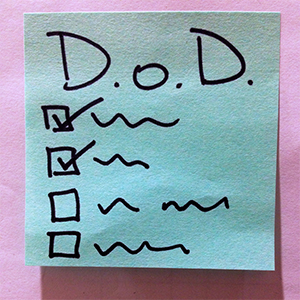
    Definition of Done does the same thing. It is a check list of all the items to be checked off before your team declares the story is completed. Unlike “Acceptance Criteria” that is specific per story and describes what the ask is, Definition of Done (or DoD for short) establishes what must be true of each product backlog item for that item to be done.

    DoD is partly done by your development team because it is their job to write high-quality, high-value software. So it is on developers and testers to define what quality is but you as Product Owner can add other criteria too. In the end both you and your team should agree on the Definition of Done before you start the first sprint. Let me explain this a bit more by showing you what my team Definition of Done is:

    Each item in our backlog will be “Done” when….

    • Acceptance criteria & functional testing is met.
    • Code is peer reviewed by another developer and meets development standard.
    • Unit tests written and passed.
    • There are no critical or high bugs open.
    • English & French content written and validated.
    • Feature is tested across supported platforms & browsers as per the Official Canada Post browser support.
    • Feature is tested for Accessibility; Web Content Accessibility Guideline (WCAG2.0) targets level A, AA.
    • Feature with new UI elements is tagged for analytic.
    • Remaining hours for task set to zero and task closed in Jira.

    As you can see in example above the first four items define quality baseline of the code. However other criteria such as accessibility, dual language or administrative tasks in Jira speak to other aspects of being “done”. Definition of Done is a living document which means that you have to keep revisiting it to refine the “done” criteria to make sure they are still up-to-date and relevant to your stories and products. For my team during every sprint planning we quickly visit the DoD to make sure if it needs further tweaking.

    After using DoD from stories for a while now I have extended them to software releases as well. I find having a release DoD where I have a checklist of all the things to be done prior to release extremely helpful.  This helps my team not to miss any big ticket item. Here is DoD prior to every release:

    And finally one last check list that is very powerful is to have Definition of Ready for each story. Definition of Ready verifies all pre-requisit work is completed before a story is ready to be pulled into a sprint. For example you have a story that lets user to to a date range and export some data based that time frame. This story needs a UX pattern, visual design for date selector and copy associated with the exporting function before it can be passed on to developers. You can create a Definition of Ready checklist so that a new story will NOT be pulled into the next sprint unless all the UX, content and VD sub-tasks are defined and completed. I find this is as a great approach to take the risk dependent external work out of your sprint.

    Hope you enjoy these checklists as much as I do 🙂

  • 5 Tips for Managing Products Remotely

    After reading A Year Without Pants I became interested to know more about remote work and specifically how it works with product management. What qualities are required? What are the advantages and disadvantages? so I did some research such and interviewed a couple of my colleagues who work remotely as Product Managers. I like to share what I learned along the way with you. Let’s get started:

    The practice of working remotely has been on the rise for sometime. In US alone, number of people who regularly work-at-home has grown by a whopping 103% since 2005. (For more interesting data take a look at latest Telecommuting statistics). There is no denial that work from home is a real attractive option and if you need more convincing reasons just read the book Remote. I myself dream of working from home where I don’t need to commute to work everyday (specially in winter time), I can get something done without getting interrupted multiple times and have flexibility over my schedule.

    However most of the telecommute jobs I have seen are for well defined jobs such as software engineers, designers and customer support members.  There are few remote product manager jobs out there and I have always been wondering why? Can it be that there is no need for product managers in companies where work is done 100% remotely?

    I believe the answer lies in company’s size and maturity and not on how it’s distributed. In small companies with a single product and  a small team, different team members take on additional responsibilities to divvy up the work. Usually the founder who is also the CEO takes on responsibilities such as talking to customers and defining product vision. Then designers and developers are responsible for turning that vision into workable software. In this setting, the product management role is distributed among the team and no single person is responsible for the job.

    However as soon as the company grows and the product becomes more complex the work itself becomes too much of an overhead to do for designers, developers and founders on top of what their main responsibilities. Someone needs to clarify Who we are building for and Why to free up the rest of the team to focus on How. This is when Product Manager is added to the team. (Take a look at black box of product management article for an in-depth explanation).

    So if being a remote team as oppose to a co-located one has no effect on having a product manager role, how does remote product management work? What qualities are required? What are the advantages and disadvantages? I sat down with three of my colleagues who all work as Product Managers remotely to get answers to my questions.

    For my first interview I talked with Alex whom I had the pleasure of working with for a long time at OANDA. OANDA’s main focus is currency trading and its popular online trading platform known as fxTrade enables trading volume of several billion dollars a day. Alex has been working remotely for the past 6 years and he currently manages fxTrade across all platforms (Web, Mobile Browser, Mobile App). Design and development are all centrally done in Toronto. Alex travels every 2-3 weeks from San Francisco to Toronto and stays for a week.

    Then I sat down with Barbara who works as Product Manager for Mozilla. Barbara works on Firefox browser for Android app. Her development team is geographically dispersed across the globe. Barbara is based in Toronto but she travels once a month to one of Mozilla offices in States and stays with the team for a week.

    My final interview was with Saeed who works in Product Management at Informatica. Informatica provides solutions around data for the Cloud, big data, real-time and streaming. Saeed is based in Toronto but his team is spread across India and in northern California. Except for annual planning meetings in Informatica headquarters he does not travel.

    Top 5 observations about working as a remote Product Manager:

    Here are the most interesting things I learned through my interviews:

    1. We all work remotely to some degree

    “Business expand across locations. With the exception of small companies, where everyone is in one location, as a Product Manager you have to work with remote people and teams… and of course, customers and partners are NEVER at HeadQuarter. 🙂 “

    When you come to office even when you are co-located with the development team, you need to work with other parts of business such as Sales, Marketing, and Customer Care which may be at different locations and time zones. So being able to work with others through email, phone, chat or whatever remote communication channel is a must no matter how you work.

    2. Communication and Collaboration

    “None of the team members I regularly work with are in the Toronto office, pretty much 99% of my meetings are held over Vidyo (a video chat system used at Mozilla)…We [also] heavily use IRC and Slack, as well as Bugzilla and email to communicate.”

    Email, phone, video conferencing and instant messaging (Slack being the most popular one) are used for communication with team members. However what is more important than choice of tools is to make sure crucial information isn’t lost between colleagues. Barbara and Alex find traveling at least once a month necessary to make sure that everyone in the team is in-sync.

    For collaboration, screen sharing software like WebEx, project management tools such as Trello and wiki softwares to quickly edit content like Confluence and Google Docs are all part of the remote toolbox. Good written communication is the single most important skill to make sure everyone has a shared understanding of what the ask is and how to provide a solution.

    3. Trust is the Key

    “I have built a close relationship with my team over time and now I trust my them to know my vision really well… I’m confident that they will be able to represent and defend this vision to others during a meeting when I’m not in the room.”

    Product Manager has to earn the respect and trust from the programmers and designers. With trust, PM can discover how to get the best possible work from the team. If there is clarity on the goal and a criteria that defines it, then we can speak the same language about what we need to do to get there. This issue becomes even more important when you work remotely as you need to build relationship over time and and you need to make sure you can effectively convey the vision to everyone on the team.

    4. Biggest Advantages

    “I can be more productive because I’m working somewhere else. I don’t get pulled into meetings where I can’t contribute mostly because I’m not in the office. As a result, until something important comes up that needs my attention I don’t get called into meetings.”

    One thing that stands out in addition to all of the advantages of remote working, is the fact that you don’t get tied up with unnecessary things to do inside the office. Instead you can use that time into do some strategic activities like talking to customers, delving deep to understand the problem and figuring out product/market fit. These tasks require long and uninterrupted attention which is something that gets harder to come by when you work in a room with 10 other team members and a constant flow of chatter and calls.

    5. Main Drawbacks

    “There are advantages to working in the same office as the product team. It’s very easy to get the group together to discuss an urgent issue. The proverbial “water cooler conversations” are only possible when you are co-located. There is a lot of information that can be gained simply through casual discussions, having lunch with someone or even “overhearing” something in the hallway. And quite honestly, having timely information IS very important managing products.”

    This quote definitely captures two themes that keep coming up. The first one is you can’t walk into an office and give a brief about what was just decided in another meeting. This disconnect can lead to informational asymmetry and misunderstanding. You have to be very disciplined in dispersing information. Sometimes you need to set up multiple meetings just to convey the same info because it’s hard to set up a meeting that works for everyone. Another important thing is to have a central knowledge repository where everything is organized and be vigorous to keep it up-to-date.

    Finally emergency situation or when a project needs a lot of coordination from multiple teams having an on-site team is so much easier than orchestrating activities between multiple time zones, and only being able to rely on chat, phone and video to work things through.

    Conclusion

    All in all I think working as a remote product manager is not fundamentally different from working with a co-located team.  There will always be a sense of FOMO (fear of missing out) when dealing with remote teams, so over-communicating is often better than assuming team members will find things out through other means. You also have to work harder to build the relationship and get used to different working styles of the team.

    Note about this post’s image: It is taken from Trello blog which has an insightful article about remote working.



  • Writing Technical Stories

    Recently I gave a talk about writing technical stories and ways I have found to slice user stories thinner at Product Camp Toronto. I thought it’d be good to share some ideas from that talk here as well.

    I work as product manager for epost which is one of the biggest online document delivery and management systems within Canada. epost allows users to view, pay and manage bills online and roughly one in ten Canadian use it to view their pay stubs, utility bills and tax statements among others. Right now I am in charge of leading a scrum team to redesign epost to improve web and mobile user experience. I am also responsible to revamp epost API service calls and to integrate them with Canada Post, banks and mobile apps.

    My team is one of the first teams working Agile within Canada Post, so we are all new to the concept of finishing user stories within a two week sprint. And after the first few sprints I realized that we were constantly behind schedule. Our flow for getting a story done looked something like the following:

    user story flow

    Creating API call and gateway call would take half sprint and front-end will work on the last leg of sprint to get it done. So when the story was ready for QA we were out of time and stories kept piling up to the next sprint!

    I also realized during our sprint planning and release planning a bunch of tasks get discovered and brought up that are not identified earlier. By the time these tasks are done, we are already late with the sprint. It was clear to me that I needed to write smaller stories but how?

    With a help of a my great Scrum Master Peter Moreira and User Story Mapping (I review the book in a future post) I came of with the following strategies.

    Write Technical Stories (when necessary)

    I decided since any given back-end service call will be consumed by multiple end-points it makes sense to slice a story further into an API-specific one and a front-end/UI one. API story is still valuable and independent (sort of) but it can be estimated and worked on by itself. This way I could prioritize the API story ahead of front-end story to provide much needed time for UI and QA to be done.

    This was great however I didn’t know how to write user stories about API, web services and other technical stories that are not necessarily user facing. More importantly I was struggling to fit the story into “As a user I want to — so that I can —” template.

    “As a front-end developer I need to supply mail list data so that it shows as a list view of mails” sure sounds weird!

    I came across this excellent article that confirmed my belief not to fit the story into a template when it doesn’t fit. So for technical stories I clearly write Who the end-points consumers of the API call will be, What is expected acceptance criteria of each of the end-points are and what it the expected output of this API is and finally Why this API call is important to develop. I talk to developers to understand what does API generate, how it can be validated and make sure there is alignment on acceptance criteria prior to grooming session. From my point the story is usually done once I can see API call and the data generated in Swagger and all the security criteria is met.

    So a user story that looked like this before:

    —As a Chief Household Officer, I want to filter mail by service provider name so that I more easily find my mail

    the API story will look like this:

    —We need an API call used by Canada Post, native app and our bank partners to filter mail by a service provider so only mails by that provider shows up

    Acceptance Criteria

    • Verify that the request get thru the service layers and receive a reply within 2 seconds
    • Verify that the request has necessary Oauth permission to be exposed externally
    • Verify that the request is generated in both XML and JSON formats
    • Verify that records are returned from oldest to newest

    —Separate Success and Error Stories

    Another trick I’ve found effective to write smaller stories is to focus one user story only on the happy-path, while writing other stories for when things went wrong, edge cases. For example for file creation user story write one story specifically about creating a file without any problem but write several more stories to cover the file name maximum character, acceptable  characters etc.

    I would love to know if you have other ways to slice a story further. Please share them with me in the comments below!

  • How agile is your team?

    Output vs Outcome

    I work at a big corporation that is transitioning to Agile. I know this may come as a shock to my readers but yes it’s true! Although many small companies and start-ups have embraced Agile and Lean ways of working for many years now, big corporations specially corporation not focused on technology are just testing the water when it comes to making this transition. It is a big change for many people who’ve worked the same way for many years.

    Given that my agile team is new and green I was thinking of ways to measure my team and be able to track the progress over each sprint. Here is what I’ve learned:

    The main goal of an agile team must be to minimize output while to maximize outcome and impact

    but what is the difference between output and outcome and how do you measure each?

    Output vs Outcome

    I’m reading the excellent User Story Mapping by Jeff Patton (a review soon to come) and here is how he describes the difference between Output and Outcome:

    “Everything between the idea and the delivery is called output. It’s what we build, but while it’s necessary the output isn’t the real point; it’s not the output that we really wanted. It’s what comes after as a result of that. It’s called outcome. We want to measure what people actually do differently to reach their goals as a consequence of what we’ve built.”

    Take a look at the image above for a moment and let it sink in. It’s crystal clear now isn’t it?

    Measuring Team’s Output

    At this post I’m only concentration on measuring Outputs like features, enhancements, requirements, specification within an Agile team. Measuring Outcomes is really about understanding bigger picture and product/market fit and I like to discuss it completely in a separate topic.

    So here are what I learned:

    For outputs the most common factor to measure is Velocity. Velocity is commonly referred to number of story points completed within each sprint; (and assuming this metric is not abused) it’s valuable as a predictive metric as it starts to normalize to show how much the team can produce in any given Sprint. The expectation is that over time an increased team velocity means shipping more features faster.

    However in my company we are still limited to predefined timelines for enterprise releases (I know this is an almost non-issue for startups) so for my team’s Velocity doesn’t necessarily translate to stories completed and ready to ship. At this point all we can do it to bundle stories completed and mark them as ready to go per release.

    Another metric that I found useful is the number of bugs generated during each sprint. Again over time we want to decrease this. My team is new to AngularJS and one thing that happened is that refactoring the code from one sprint to next broke a lot of things.

    Another interesting point learned from Quora is qualitative feedback we get during Retrospective meeting and use those improve upon. Pick something to improve and track that for a few iterations to make sure things are getting better. Once things have improved stop tracking, and move on to the next pain point. Again in my team’s case we’re trying to see what are the ways we can get rid of mini-waterfall cycle we seem to get trapped on every time. So far we’re concentrating on two issues: 1) increase expertise in Angular by having Angular hours with other developers. 2) interchange roles and responsibilities of back-end API and gate-way/middle-ware developers.